- Use this link to access your account: https://www.google.com/business/
- If you’re not logged in, do so by going to your Google My Business dashboard. (sign in on upper right corner)

- Click “See your profile”

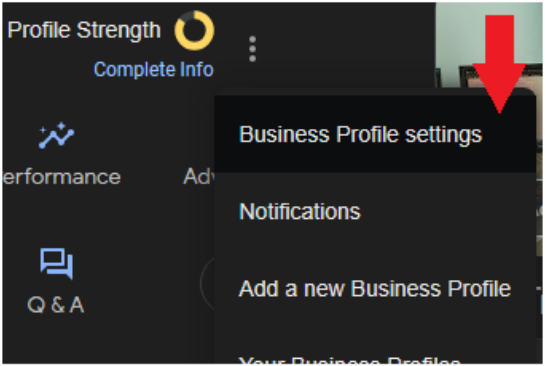
- Click on the three dotted menu dropdown near the top

- In the dropdown, click on ‘Business Profile Settings’
- Next, click on the ‘People and access’ option

- Click on the ‘Add’ button.
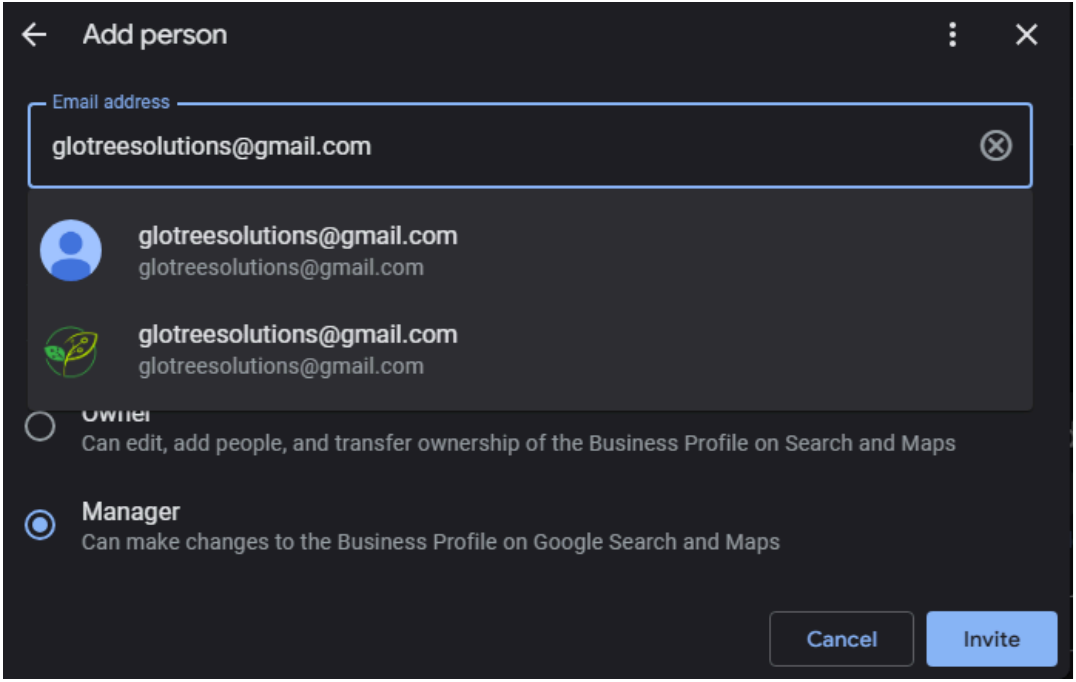
- Enter the email address of the person you want to grant access to. (You are able to take away access at any time.)
- In this case, my email address is glotreesolutions@gmail.com (the one with the leaves)
- In this case, my email address is glotreesolutions@gmail.com (the one with the leaves)
- Below where you entered the email address, select the ‘manager’ option, then click ‘Invite’
Great work! Now that you’ve completed this step, I will receive an email with instructions to accept the invitation and access your Google Business Profile.


